CAMWorks Broaching - Turn Setup & Mill Setup

Broaching is a unique machining process that involves removing material using a toothed tool called a broach and straight linear motion. Think of it as a specialized and efficient way to create precise shapes in a piece of metal or other material. This process is particularly useful for producing complex forms such as splines, keyways, or gears. CAMWorks does not include a dedicated broaching operation. However, using existing capabilities, a working code can be produced.
CAMWORKS Broaching in a Turn Setup
In a CAMWorks turn setup, the broaching toolpath is similar to a rough cycle (OD/ID), done in long-code, albeit with the spindle not turning (M05 or S0) and locked at a specific location. This locking could be M19 (or M19 Rr of Haas). The small cuts (usually .002-.005) required for each broaching pass are the first cut amount and max cut amount of the Bore(Turn)Rough operation. The post processor needs to have a control added (see image below) that can set the spindle, which is needed for broaching.
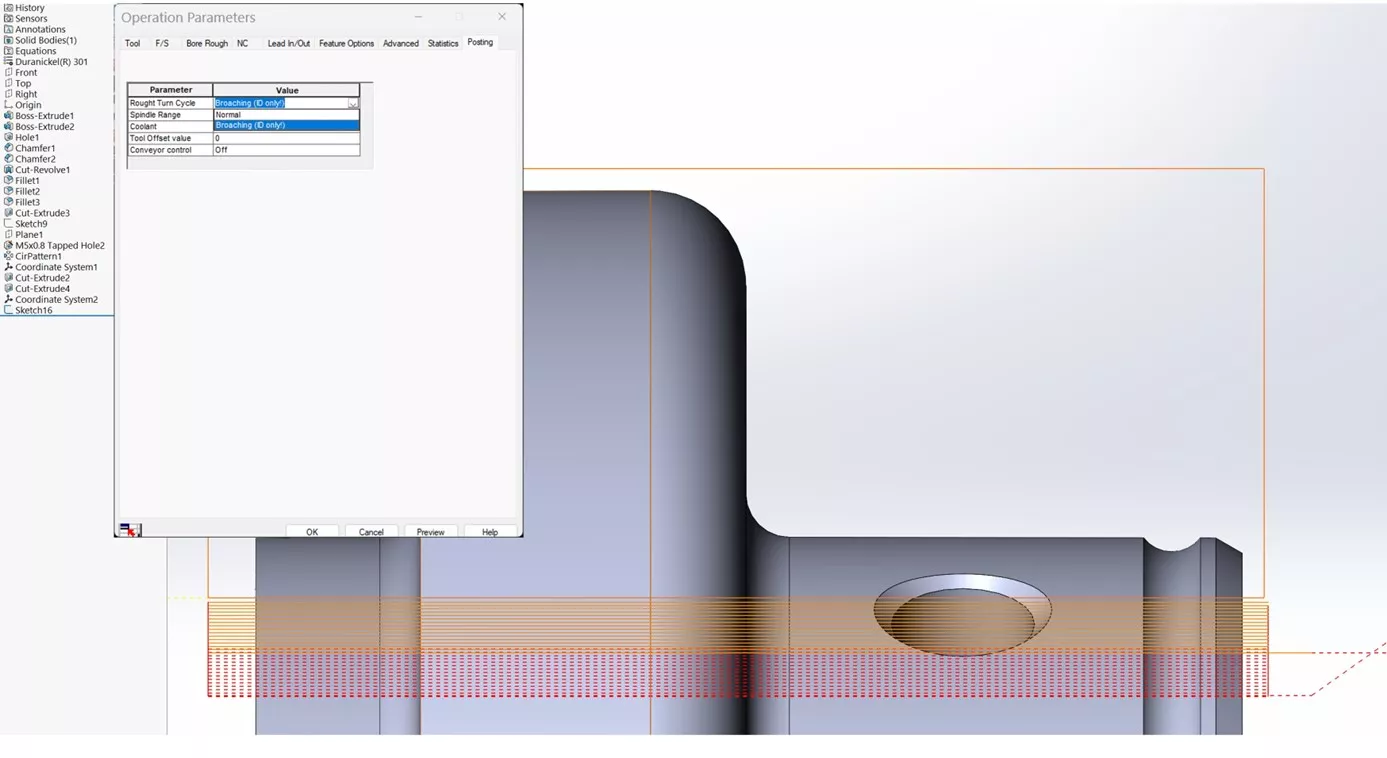
For broaching in a turn setup, create a RoughBore (ID) or TurnRough (OD) operation and then edit its parameters. The tool can be designated as a regular turning tool. The important thing is to match the tool touch-off point to the driven point (usually the center edge) of the broaching insert.
Sample part: Broached Keyway - Turn Sample
This sample part features different configurations (Mill-Turn-MillTurn) to illustrate the broaching in a Mill/Turn setup of an ID keyway, done using a 2mm insert.
CAMWORKS Broaching in a Mill Setup
Broaching in a mill part setup has similar requirements to broaching in a turn setup. In either case, the spindle must not be allowed to rotate.
Sample part: Broached Keyway-Mill Sample
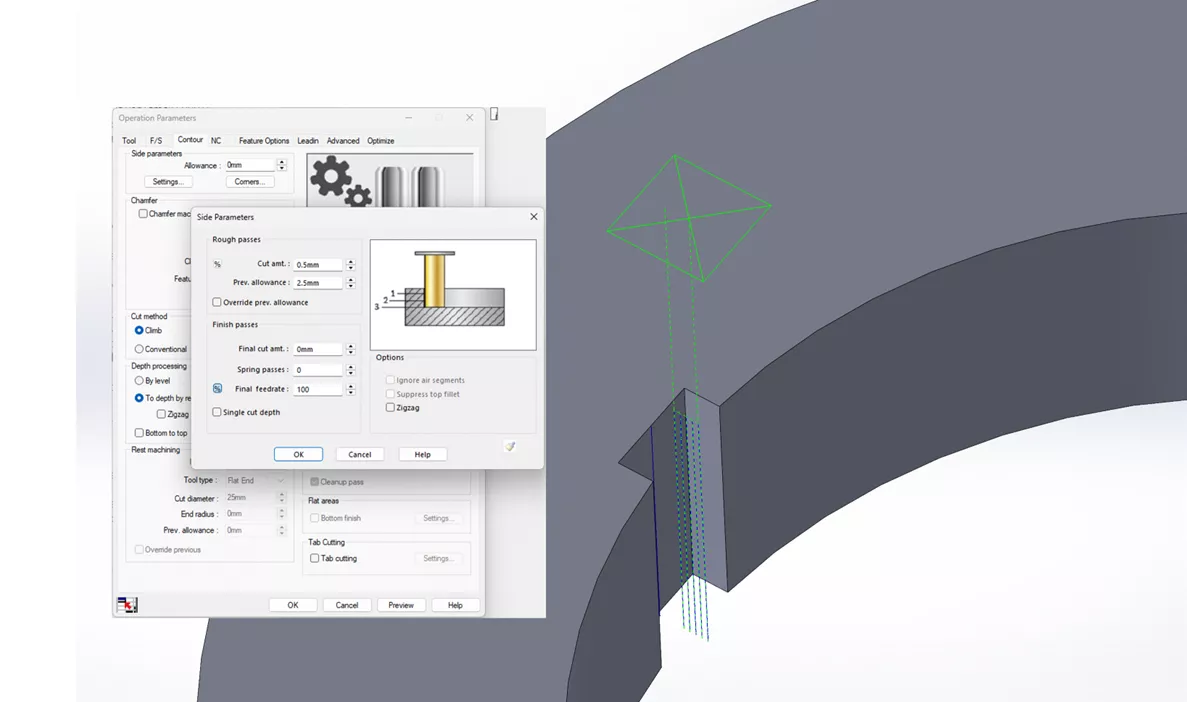
A Contour Mill operation is used on an Open Profile whose length is very small (.0001), going to the depth of the broached length (usually the thickness) of the part. We then use the settings of the Side Parameters (Contour tab) to obtain the small cuts (usually .002-.005) needed for broaching.
The tool diameter used in the operation needs to be the distance between the center of rotation of the spindle and the edge tip of the broaching insert. See the Sketch4 of the second sample part. Toolpath center must be set to “width,” and CNC Compensation must not be used.
We can set the spindle to be S0 RPM. However, some machines will require that, in addition to stopping the spindle, we align it, usually with the M19. Some machines will allow the M19 Rr, where r represents the angle from the X-axis at which the tool should stop and lock. The information regarding the spindle locking capabilities of the machine must be part of the custom post processor.
If roughing of the broached area is done properly (or if you are cutting a very soft material), you can plunge the broach, which can be done with a simple curve cut. Sketch2-SingleBroachPlunge in the sample part can be used to do this. Your mileage may vary…. because we cannot render the exact shape of the tool.
Some machines, like Haas, will have a dedicated controller cycle to broach. See this video:
This type of cycle can also be produced by a custom CAMWorks processor. Just like the Haas G156 command, this allows broaching operations to be added to any canned drilling cycle. If you're interested in having a post processor written (or modifying an existing one), contact your CAM Sales Representative for more information.
For machines without a dedicated canned cycle, CAMWorks cannot produce the underlying parametric macro shown in the video. The macro will have to be written (and possibly assigned to a code) at the controller.
Conclusion
In conclusion, although post processors can streamline broaching operations, broaching is possible in CAMWorks in both turn and mill configurations by leveraging existing capabilities, with careful setup.
Learn More About CAMWorks
When to Use an Open Pocket Without Sketches in CAMWorks
What's New in CAM 2026: SOLIDWORKS, CAMWorks, & More
How to Machine Large Hole Chamfers in CAMWorks
About Krystal Petersen
Krystal Petersen is a SOLIDWORKS Technical Support Engineer based out of Auburn Hills, Michigan. Krystal studied Product Engineering at Oakland Community College and has earned her CSWA and CSWP Certifications. She joined the VAR channel in 2015 with DASI (now GoEngineer). Krystal is a huge fan of Star Wars and likes to spend her off time fishing and camping.
Get our wide array of technical resources delivered right to your inbox.
Unsubscribe at any time.