How to Color Code SOLIDWORKS PDM Warnings

SOLIDWORKS PDM can help users quickly understand the status of files using warning icons. In the PDM add-in, these icons appear right next to the file name, each providing different information. In Figure 1, notice that part 10000506 has a yellow exclamation point and a red clock. This is PDM indicating that the assembly is referencing a version of 10000506 that's older than the latest version stored in the vault.
Thanks to these SOLIDWORKS PDM warning icons, I now know that a 'get latest' must be performed on the part prior to working on this assembly. These icons are great, but how can we make them stand out more? The answer is to color-code the SOLIDWORKS PDM warning icons with background colors.

Figure 1: PDM Warning Icons
Color Code PDM Warning Icons with Background Colors
Here, we can see the same assembly at version 5/7 with the colors indicated. Not only are there warning icons, but we can see that while most of the files are green (green is good), the 10000506 file is yellow, and the assembly is red. Now I don’t even need to look at the warning icons if I know what the colors mean.
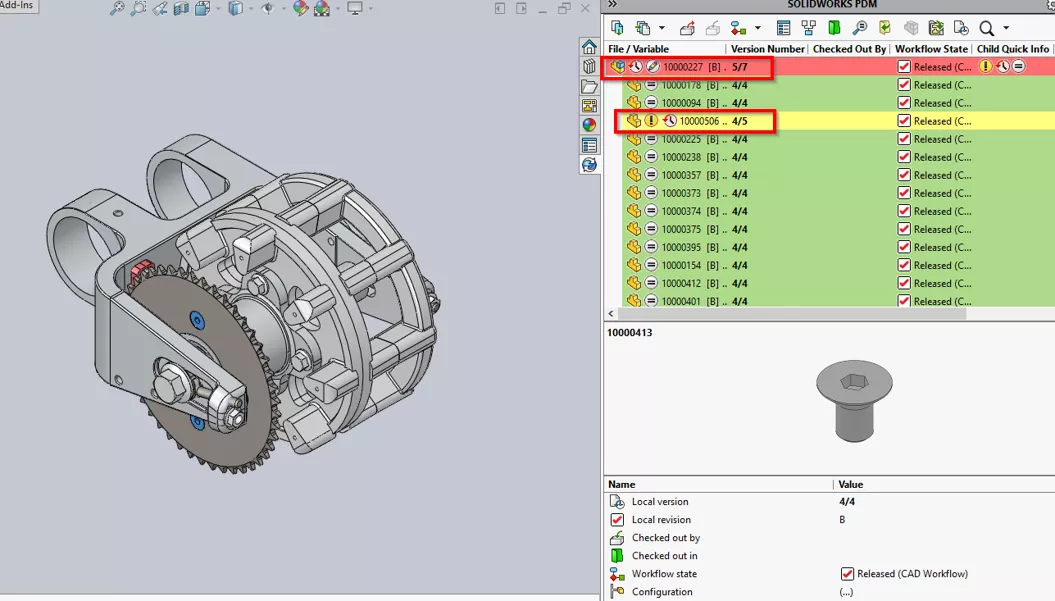
Figure 2: PDM Background Colors
How to Set It Up for Yourself
To view these settings, click Tools > SOLIDWORKS PDM > Options from inside your SOLIDWORKS session.
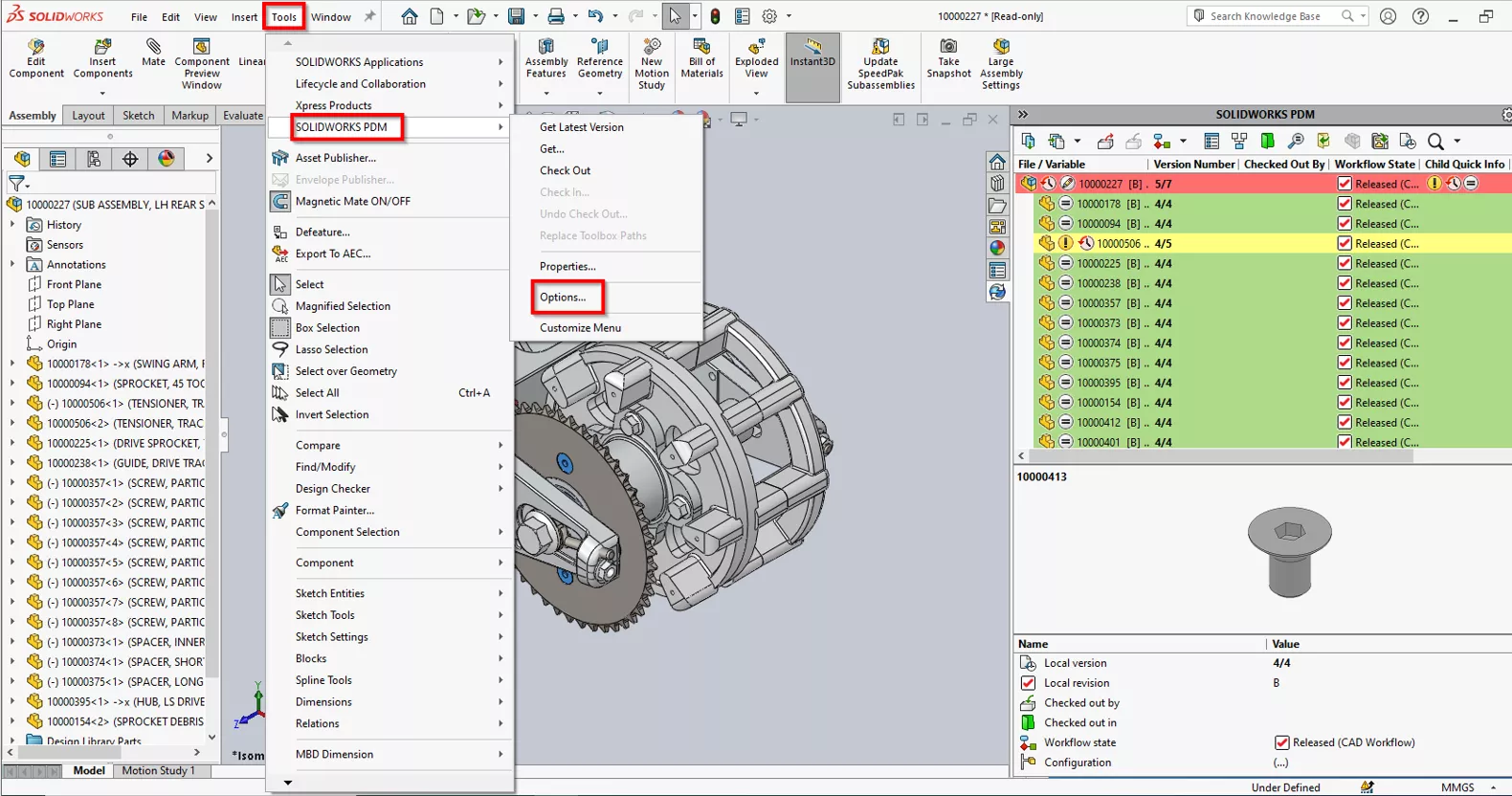
Figure 3: SOLIDWORKS PDM Options
Next, click on the View Setting tab at the top. Under Display Status, click the check box to show background colors. In the box at the bottom is a list of possible statuses, along with their icons and default colors.
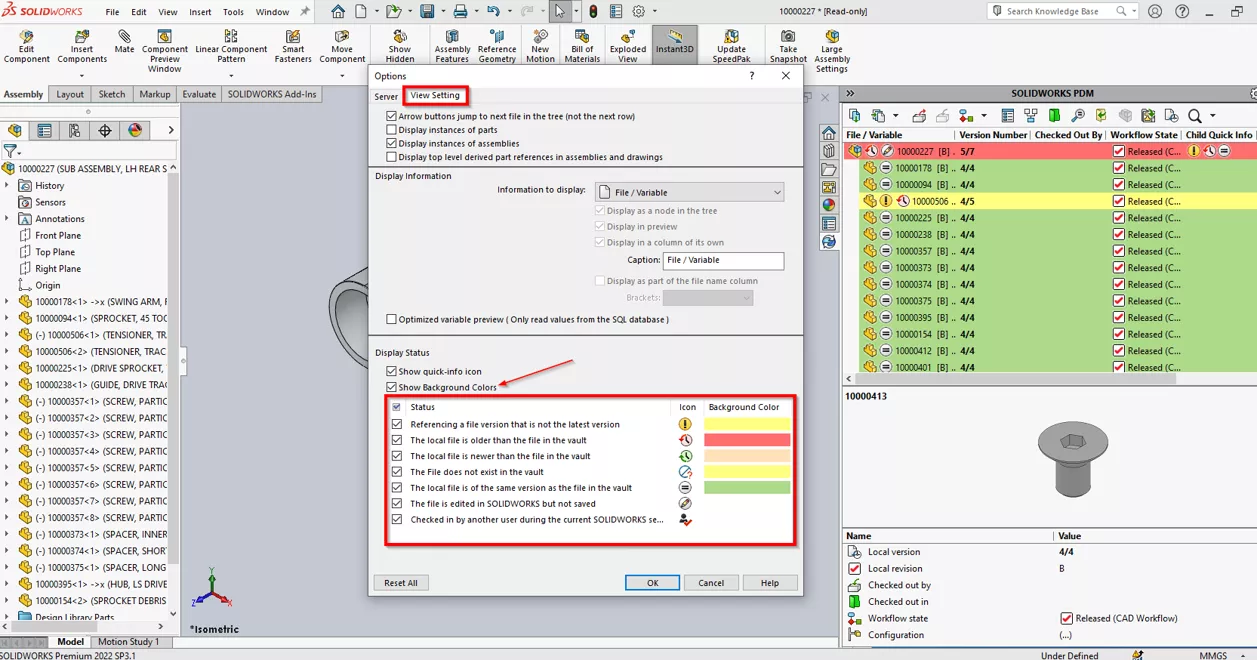
Figure 4: Display State Options
You can also customize the colors for each status by clicking the drop-down arrow. These display settings are client-specific, so users can customize them to meet their needs.
24 Tips to Master SOLIDWORKS PDM
SHORTCUTS ⋅ SEARCHING ⋅ PDM ADD-IN
24 of our expert tips to help you master using SOLIDWORKS PDM. Improve performance, find files faster, and work like a pro.
I hope you found this article explaining how to color-code SOLIDWORKS PDM warnings helpful. Learn more about SOLIDWORKS PDM below. Additionally, join our GoEngineer Community to participate in discussions, create forum posts, and answer questions from other SOLIDWORKS users.
Related Articles
Deleting a Local Vault View in SOLIDWORKS PDM
SOLIDWORKS PDM Settings Dialog Recommendations
New SOLIDWORKS PDM 2026 Vault View Sync & Ownership Transfer
SOLIDWORKS PDM System Resources Starting Point

About Gary Foster
Gary Foster is a CSWP and Data Management Specialist at GoEngineer. He earned his Bachelor of Science in Mechanical Engineering Technology from the University of Houston and has many years of experience using SOLIDWORKS and PDM.
Get our wide array of technical resources delivered right to your inbox.
Unsubscribe at any time.