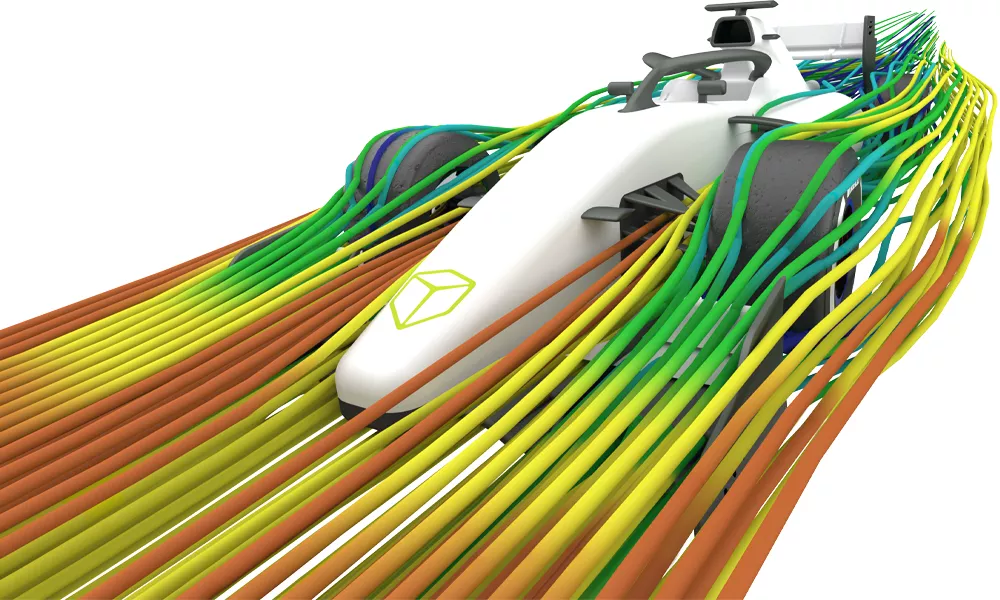
Tosca Optimization Suite
solver-neutral Generative Design: Optimize for weight, stiffness, durability, & fluid flow

Optimize Without Compromise: nonlinear Topology & Shape Optimization.
Engineers today are under constant pressure to deliver lighter, stronger, and more energy‑efficient products, without adding cost or sacrificing durability. With these challenging (and often competing) demands, "design, simulation, fail, repeat" loops can become a serious bottleneck.
The solution is nonparametric optimization with SIMULIA Tosca. Tosca uses your FEA & CFD analyses to drive design decisions, automatically determining the optimal material distribution and surface shape, delivering lightweight, durable, and production-ready concepts in a fraction of the time.
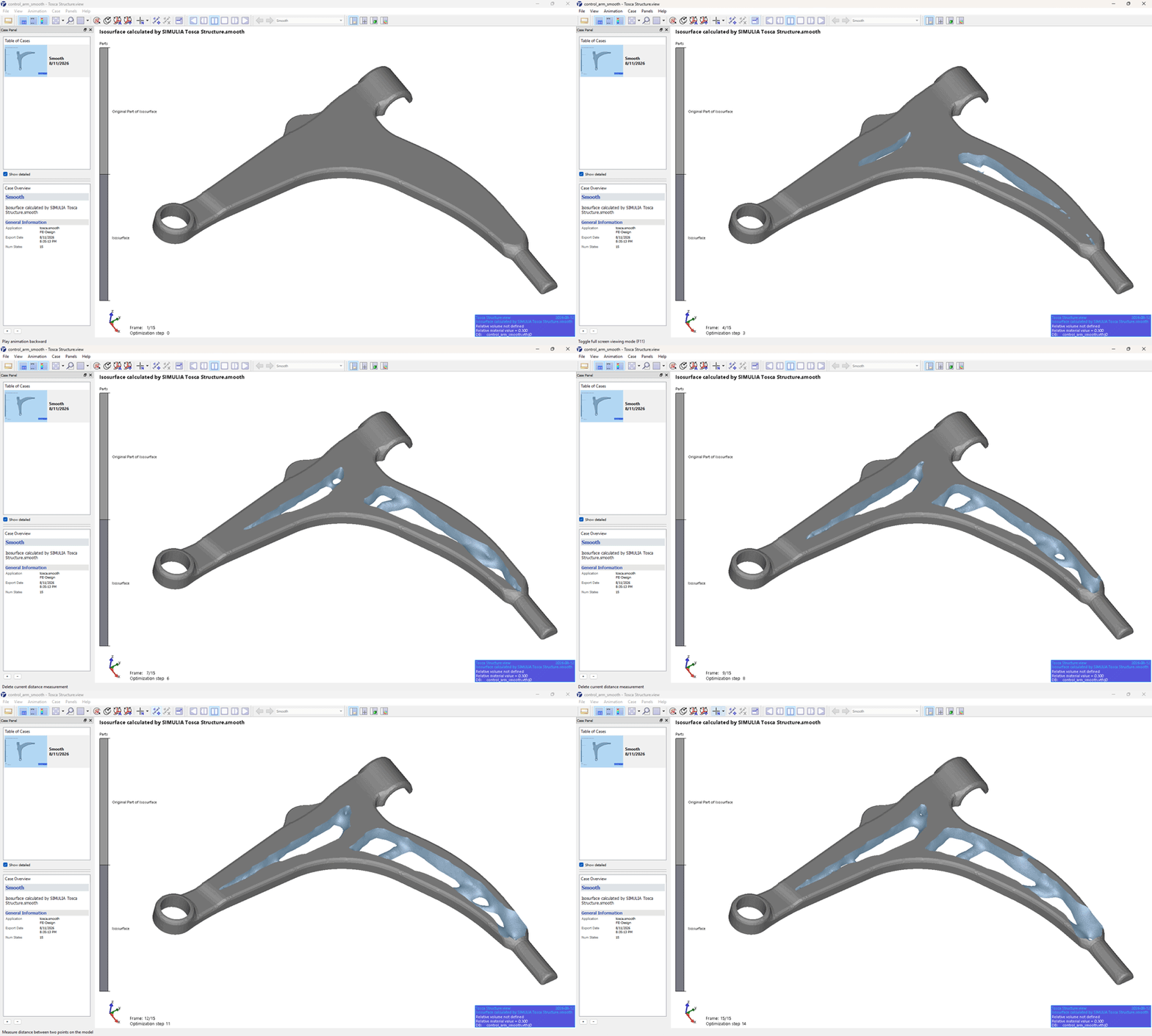
How Does Tosca Optimization Work?
Step 1: Input
Load in Your Existing Physics
The simulations that used to validate your design will now drive your design. Start with your existing FEA setup of your critical load cases. They can be multiple, complex, and/or nonlinear. In your simulation FE, replace part(s) of interest with their full design envelopes or identify specific areas to redesign.
Step 2: Setup
Define the Design Space & Rules
Select an optimization method (e.g., topology, sizing, etc.). Define constraints (e.g., draw direction, fixed regions, local deflection, etc.) and goals (e.g., maximum stiffness, minimum mass, etc.).
Step 3: Automate
Run the Solver Loop
Tosca launches an "analysis-design update" loop, running your simulations and modifying the design space to drive the next simulation closer to your goals while respecting your constraints.
Step 4: Output
Smooth, Validate, & Export
Tosca gives you a smooth isosurface of your final optimized design. Remesh and validate with final FEA, then export neutral CAD geometry for your designer.
Why Choose Tosca Over Other Optimization Tools?

Non-Parametric Freedom
Tosca utilizes the full design envelope (or whichever part you choose) to solve your engineering challenges, rather than just predefined CAD parameters.
The non-parametric approach uncovers efficient, organic, often unintuitive load paths that parameter tweaking simply cannot.

Solver Neutrality
Tosca is solver‑neutral. Bring the FEA and CFD tools you already use, such as Abaqus, MSC Nastran, Ansys Mechanical, and LS‑DYNA.
The analysis decks that you’re already using to validate your designs? Apply them now to Tosca, where they can drive the optimization cycle.

Nonlinear Robustness
Tosca excels with realistic, high-fidelity nonlinear simulations. The large models, complex interactions, and advanced material behaviors – it’s all fair game.
Combine this with Tosca’s manufacturing constraints, and you can rapidly generate manufacturable concepts that meet real-world performance targets.
Abaqus User? You Already Own Tosca!
If you have a current Abaqus license, you can use it to run Tosca. Contact GoEngineer to learn how to download and install Tosca and develop your own workflows.
The Tosca Optimization Modules
- Topology
- Sizing
- Shape
- Bead
- Flow
Topology
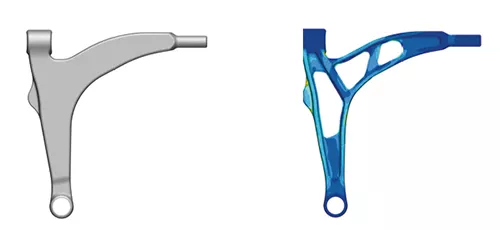
Tosca Structure.topology removes the guesswork from early-stage design. By starting with the maximum allowable design space, it identifies the optimal material distribution to carry specific loads. This module is essential for generating lightweight, high-stiffness concepts that defy traditional engineering intuition, effectively answering the question, "Where should the material be?" before detailed design even begins.
Technical Features:
- Non‑parametric, element‑level material control
- Tosca adjusts material density directly at the element level to uncover the most efficient load paths early in the design cycle.
- Powerful optimization algorithms
- It offers both sensitivity‑based methods for handling complex constraints and controller‑based algorithms optimized for fast stiffness‑driven results.
- Advanced physics and nonlinearity support
- Tosca evaluates true FEA responses including stiffness, stress, displacement, and eigenfrequencies while handling contact, large deformation, and hyperplastic materials.
- Manufacturing‑ready and solver‑neutral workflow
- Built‑in controls such as member size limits, demold/casting rules, symmetry, frozen regions, and stamping constraints ensure manufacturable concepts, while direct integration with FEA solvers like Abaqus, Ansys, and MSC Nastran delivers accurate, traceable optimization aligned with real product performance.
Sizing
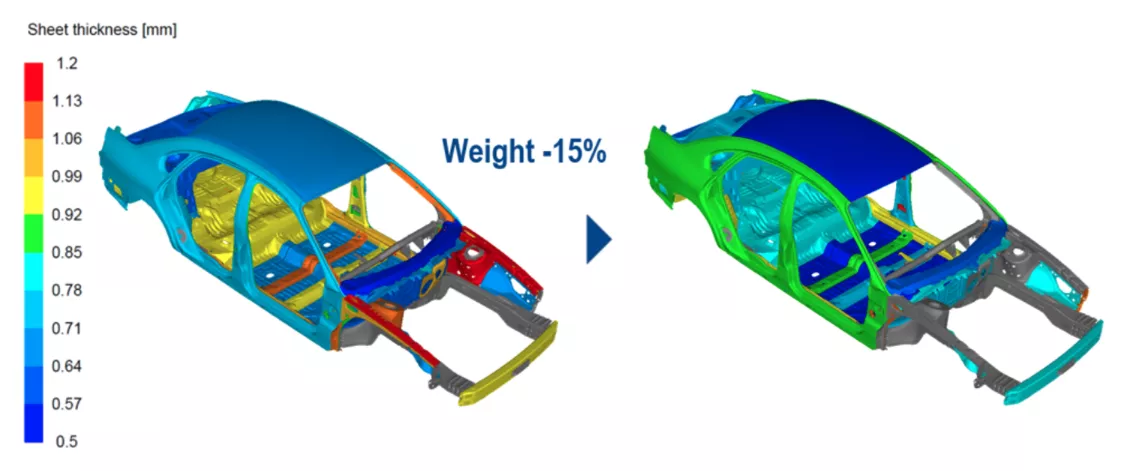
Designed for the rigorous demands of automotive and heavy industry, Tosca Structure.sizing fine-tunes the thickness of sheet metal and beam structures. It allows engineers to shave weight from complex assemblies while strictly maintaining comfort, safety, and structural integrity. This module automates the tedious process of balancing mass against performance across thousands of elements, ensuring every gram of material justifies its existence.
Technical Features:
- Element‑level thickness control for detailed lightweighting
- Tosca adjusts thickness at the element level to fine‑tune stiffness and behavior without changing the part’s geometry.
- Scalable for full‑vehicle and large industrial models
- The solver handles millions of design variables, making it suitable for large‑scale assemblies like BIW structures, machinery frames, and heavy‑equipment enclosures.
- Optimization with thickness bounds, clustering, and manufacturing rules
- Engineers can apply thickness limits, symmetry, stamping constraints, and clustered updates to ensure the optimized results remain manufacturable.
- Solver‑driven accuracy across multiple performance targets
- Tosca runs directly on validated Abaqus or Ansys models and supports stiffness, strength, dynamic behavior, and NVH‑related objectives while respecting contact and nonlinear behavior outside the design region.
Shape
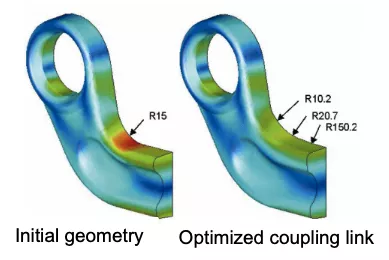
When local stress concentrations threaten durability, Tosca Structure.shape acts as a precision instrument for refinement. It automatically modifies surface geometries—morphing fillets, radii, and transitions—to homogenize stress distribution. This process significantly extends fatigue life without requiring a complete redesign, solving the "last mile" of structural validation where parametric CAD changes are often too slow or restrictive.
Technical Features:
- Non‑parametric surface adjustment
- Shape optimization directly modifies surface node positions on the FEA mesh, eliminating the need for parameterized shape vectors.
- Mesh smoothing
- Utilizes advanced algorithms (Constrained Laplacian, Local Gradient) to maintain element quality during surface morphing, preventing mesh distortion errors.
- Manufacturing‑aware shape control
- Includes mesh‑independent constraints like demolding, stamping limits, symmetry rules, and penetration checks, ensuring refined shapes remain manufacturable.
- Stress and frequency-driven improvements
- Tosca homogenizes stresses or increases natural frequencies by growing or shrinking surface regions based on local stress levels.
- Durability integration
- Directly couples with fe‑safe to use Fatigue Life as the optimization objective while supporting nonlinear materials, contact, geometric nonlinearity, and durability‑based criteria for realistic, high‑quality improvements.
Bead
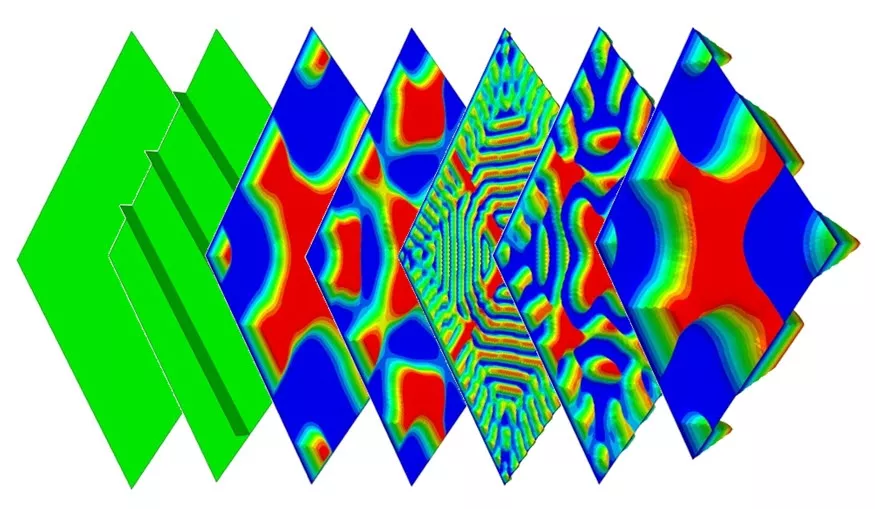
Tosca Structure.bead solves the challenge of stiffening thin-walled structures without adding mass. By automatically placing beads, embossments, and ribs, it shifts natural frequencies to avoid resonance and eliminates panel vibration issues like "oil-canning." This module is critical for NVH (Noise, Vibration, and Harshness) applications, delivering production-ready bead patterns that respect complex stamping constraints.
Technical Features:
- NVH control
- Automatically determines the optimal location and orientation of bead ribs to maximize eigenfrequencies and eliminate panel resonance (oil-canning).
- Stampability
- Enforces strict manufacturing constraints including bead width, height, and draft angle to ensure the pattern can be stamped with standard tooling.
- Design response
- Can optimize for Moment of Inertia and Compliance to resist static loads.
- Automatic bead placement & orientation
- Tosca intelligently identifies the best bead locations and directions to maximize bending stiffness or natural frequencies.
- Fast, mesh‑independent optimization
- A specialized optimality criterion enables fast convergence, and results remain consistent regardless of mesh density or topology.
- Structural response‑driven control
- Supports objectives such as compliance, displacement, and frequency targets, while applying symmetry rules and penetration checks for realistic constraints.
- Manufacturing‑aware bead design
- Engineers can specify bead height and width, ensuring the generated bead patterns are practical, interpretable, and easy to transfer into CAD and production workflows.
Flow
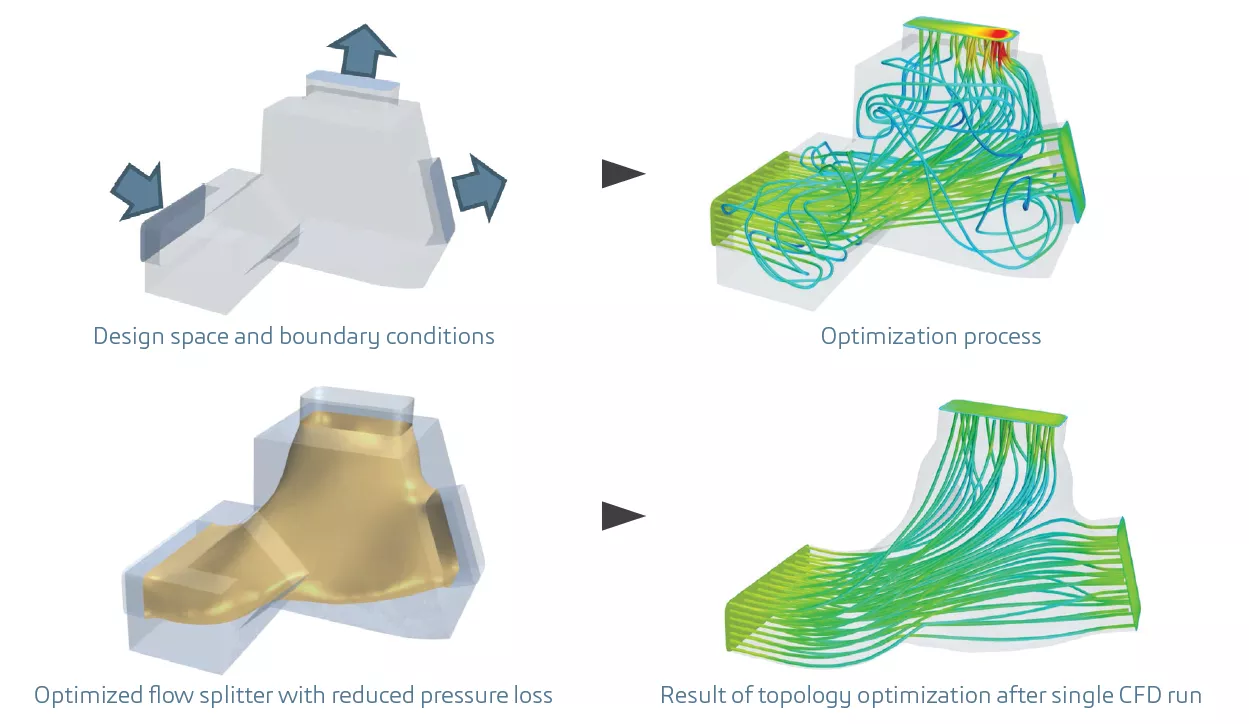
Tosca Fluid revolutionizes internal flow design by eliminating the iterative trial-and-error of traditional CFD. Using a unique non-parametric approach, it optimizes flow paths to reduce pressure losses, improve flow uniformity, and explore the best possible routing within tight packaging constraints. Whether balancing flow in a manifold or silencing a duct, Tosca Fluid carves the most efficient path automatically, early in the design phase, using your existing CFD setups.
Technical Features:
- One-run efficiency
- Uses a unique controller-based backflow algorithm that optimizes the topology during the CFD solver run, eliminating the need for iterative loops.
- Solver support
- Seamless integration with Siemens Star-CCM+ and ANSYS Fluent, protecting the customer's existing CFD investment.
- No initial design
- Starts from a defined design space (a "block" of fluid) and carves the optimal path, ideal for manifolds and splitters.
- Thermal/flow efficiency
- Optimizes flow channels intended to reduce losses and improve distribution which is key for cooling channels, ducting, manifolds, HVAC components, and flow splitters.
- CFD‑solver integration for real physics
- Works directly with existing CFD solver files (Abaqus/CFD, STAR‑CCM+), enabling topology optimization under linear or nonlinear flow conditions with full fidelity to pressure, velocity, and turbulence fields.
- Early concept acceleration
- Published positioning emphasizes fast concept creation and reduces reliance on multiple prototypes/physical tests by generating optimized proposals early.
- Targets efficiency metrics like pressure loss & uniformity
- Automatically identifies flow routes that reduce pressure drop, enhance uniformity, and support flow balancing or split‑ratio objectives in multi‑outlet systems.
Frequently Asked Questions
Integration & Compatibility
Yes. Tosca is solver-neutral. It integrates seamlessly with Ansys Mechanical, MSC Nastran, Star-CCM+, and Ansys Fluent. It acts as a wrapper around your existing solver, reading your native input files, modifying them for optimization, and using your preferred solver to calculate the physics. You do not need to translate your models into Abaqus to use Tosca.
No. Tosca Fluid is an optimization engine that drives your existing Ansys Fluent or Star-CCM+ solver. It requires a 3rd-party CFD solver to calculate the flow field.
Operation & Technical
Topology optimization is for early-stage conceptual design; it determines where material should exist in a 3D design space to handle loads. Sizing optimization is for detailed design; it determines how thick specific sheet metal panels or beam cross-sections should be to meet weight and stiffness targets.
Yes. Tosca Structure includes specific manufacturing constraints for Additive Manufacturing (AM), such as overhang control (to minimize support structures) and minimum member size (to ensure printability). It generates organic, bionic shapes that are ideal for AM production.
No. While optimization is an advanced topic, Tosca simplifies the process with intuitive GUIs (like the Tosca Structure.gui or plugins for Abaqus/CAE and Ansys Workbench). You define the goal (e.g., minimize weight) and the constraint (e.g., stress < 200MPa), and the software handles the algorithms. GoEngineer also offers Application Mentoring to guide you through your first project.
Yes. Through its integration with fe-safe and FEMFAT, Tosca can optimize a component to maximize its fatigue life or minimize damage. This is superior to simple stress-based optimization, as it accounts for cyclic loading and complex duty cycles.
General & Purchasing
No. This is a common confusion. SIMULIA Tosca is a structural and fluid optimization suite for engineering simulation (FEA/CFD) developed by Dassault Systèmes. Tricentis Tosca is an unrelated software for automated software testing.
If you have a current Abaqus license, you already have access to Tosca. This is because most Abaqus users have an "Abaqus Extended Portfolio" license, which includes Tosca and Isight in addition to Abaqus itself.
If your organization does not use Abaqus, Tosca can also be purchased on its own.
Tosca itself is lightweight, but the solvers it drives (Abaqus, Ansys, Star-CCM+) are compute-intensive. While Tosca can run on a standard engineering workstation (minimum 8-16GB RAM), we recommend hardware optimized for the underlying FEA/CFD solver you intend to use.
Technical & Workflow
Ansys Adjoint uses a less powerful shape optimization method: it modifies an existing geometry by morphing the mesh based on sensitivity information. It cannot introduce new flow paths or change topology.
Tosca Fluid, by contrast, performs topology optimization for fluid systems. It can generate new internal flow channels or design concepts within a defined design space, effectively creating a concept where no prior shape existed. It is specifically intended to reduce pressure drop and improve flow uniformity early in the design phase.
Yes. Unlike many competitors that rely on linear static approximations, Tosca leverages the full nonlinear capabilities of the Abaqus solver. It can optimize parts involving large deformation, nonlinear contact (e.g., suspension bump stops), and hyperelastic materials (rubber seals and mounts).
The immediate output of a topology optimization in Tosca is a mesh‑based representation of the optimal material distribution. Tosca Structure’s smoothing module processes the topology result to generate a clean isosurface that can be exported in formats such as STL or IGES for CAD systems. This output is suitable for visualization and can serve as a basis for manufacturing workflows, though additional geometric smoothing or reconstruction is typically required for traditional manufacturing.
The 3DEXPERIENCE GENERATIVE DESIGN products integrate Tosca‑based optimization technology with CATIA CAD tools for converting topology results into manufacturable, parametric geometry.
Tosca does not directly integrate with the SOLIDWORKS Simulation (COSMOS) solver.
SOLIDWORKS users typically export geometry through the SOLIDWORKS Associative Interface into Abaqus, where Tosca performs high‑end topology or shape optimization while maintaining a link back to SOLIDWORKS for CAD updates.
SOLIDWORKS Simulation topology optimization is great for basic, CAD‑embedded design exploration, while Tosca is an industrial‑strength optimization engine capable of nonlinear, multi‑physics, multi‑load case, high‑fidelity topology, shape, bead, and fluid‑flow optimization far beyond the scope of SOLIDWORKS.
SOLIDWORKS’s topology optimization operates entirely within SOLIDWORKS, using a single‑part "Maximum Design Space" where loads, fixtures, mass‑removal limits, and manufacturing controls guide material removal. The method is non‑parametric, focused mainly on linear static scenarios, and is intended for quick design exploration rather than high‑fidelity engineering optimization.
To ensure the optimized result is buildable, Tosca supports constraints for:
- Casting: Pull direction (demold), undercuts.
- Stamping: Bead width, height, and draft angles.
- 3D Printing: Overhang angles and minimum member size.
- Machining: Cyclic and planar symmetry.
Tosca Fluid uses a unique backflow-based algorithm. It identifies cells in the CFD mesh where flow is recirculating (wasting energy) and progressively "blocks" them during the solver run. This naturally forces the fluid into a smooth, laminar path that minimizes pressure drop.
It is best used early in the design process where it can add the most value. Use Tosca Structure when you need to improve stiffness-to-weight, reduce stress hot spots, tune thickness, or add bead stiffeners; all while keeping the analysis grounded in FEA.
It supports multiple optimization modes (topology/shape/sizing/bead) so you can move from concept layout to detailed improvement without switching tools.
Use Tosca Fluid when you want early-stage design guidance to reduce pressure drop and/or improve flow uniformity inside a constrained package space.
It’s especially useful for ducting, manifolds, splitters, cooling passages, HVAC components, and similar flow devices where "the path matters."
Tosca is positioned as non-parametric, meaning you can begin with existing simulation inputs instead of building a fully parameterized CAD/DOE framework first.
For many teams, that removes a major adoption barrier: you can focus on loads/BCs, objectives, constraints, and validation, not weeks of parameter wiring.
At minimum, you need an existing FEA solver, a working FEA model, material, loads, boundary conditions, and mesh suitable for baseline analysis. A clearly defined design space (where material is allowed to change) and non-design regions (interfaces, bolt pads, keep-out zones). Then you define your objective (e.g., stiffness vs. mass) and constraints (e.g., displacement limits).
You need an existing CFD solver, CFD simulation model, the design space (the volume available for flow paths) and packaging constraints. You will need to have CFD boundary conditions (inlets/outlets/targets) and the performance goal (e.g., reduce pressure loss, improve uniformity, split ratio). Tosca Fluid is described as working without parameterization and can use existing simulation files, which streamlines that first setup.
For shell structures, Tosca Structure’s bead and sizing approaches are used to improve stiffness and eigenfrequency behavior, which is often central to vibration/NVH-driven requirements.
In practice, teams use this to influence modal behavior earlier before committing to costly geometry or tooling.
Yes. Published Tosca Structure material highlights optimization capabilities that include both linear & nonlinear analysis, enabling more realistic optimization without forcing simplified physics.
No. Optimization is a design-direction engine, not the final sign-off step. Tosca is meant to generate improved concepts or refinements, which should then be validated with standard analysis workflows (e.g., Abaqus verification using your final geometry and load cases).
Topology results usually provide material distribution guidance that engineers then interpret into CAD features and manufacturable shapes. Tosca Structure materials describe workflows that support moving from optimization results into design variants (including morphing approaches in some cases).
Additive manufacturing teams often use topology results to define load paths and remove unnecessary mass, then apply Additive Manufacturing-friendly design rules during CAD reconstruction. You can export the results and work on the CAD packages.
Tosca Fluid is described as enabling concept designs that reduce pressure drop and improve flow uniformity, which are core KPIs for thermal/flow efficiency and system performance.
Additional Resources
Take Advantage of GoEngineer’s Extensive Knowledge Base and Resources

Find a Solution
Our robust Knowledge Base contains over 12,000 resources to help answer your product design questions. From basic CAD questions to in-depth guides and tutorials, find your solution here. Find a Solution

PROFESSIONAL TRAINING
Improve your skills with professional training and certifications in SOLIDWORKS, CAM, 3D Printing, and 3D Scanning offered four ways: self-paced, online, on-site, or in-classroom. Certified Training Courses

BLOG
#1 Technical Resource Worldwide - Right at your fingertips. Search or browse through hundreds of SOLIDWORKS tips & tricks, additive manufacturing product developments, announcements, how-to guides, and tutorials. Blog

YouTube Channel
Our YouTube channel hosts hundreds of educational tutorials, product demonstrations, recorded webinars, and best practices for all of our products and services. GoEngineer's YouTube Channel
ONLINE STORE
Order 3D printing materials and consumables, enroll in SOLIDWORKS training classes, and buy official GoEngineer gear directly from our online store. Online Store

WEBINARS
Our engineering webinars are hosted by some of the top experts in the industry. They are always recorded, always free, and always offer a live Q&A. WEBINARS
3D Printing Services
Need to 3D print a part? Our Additive Manufacturing experts will 3D print your part and deliver it to you using the latest technology on one of our professional FDM, PolyJet and SL 3D printers. 3D Printing Services