How Formlabs Automation Helps University Labs Handle Peak Print Demand

Every autumn, university engineering labs and campus makerspaces hit the same wall. Within weeks of classes starting, senior capstone teams and introductory CAD students hit their first major project deadlines, flooding the additive manufacturing queue.
For lab managers and teaching assistants, managing this surge often devolves into an exhausting routine: scraping parts off SLA build plates, handling solvent baths, and spending hours manually bead-blasting SLS components. When your TAs spend their time as machine operators to keep up with production demands, instead of as instructional mentors, education suffers.
Scaling your campus prototyping facility doesn’t have to mean doubling your square footage or hiring a second shift of lab staff. By pairing targeted SLA and SLS hardware automation with smart queue management software, campus labs can handle more student jobs per week, keeping TAs focused on teaching.
Academic Prototyping Bottlenecks
If your lab relies on manual labor at every step of post-processing, increasing your lab capacity probably isn’t a matter of adding printer availability, but reducing the manual touchpoints that stifle productivity.
- SLA: Manual part removal, resin tank swaps, solvent handling, and unpredictable post-curing schedules.
- SLS: Cool-down delays, messy powder management, and labor-intensive manual depowdering.
- Administrative: Disorganized file submissions, duplicated material setups, and manual print queue management.
Resolving these friction points requires streamlining both the physical post-processing hardware and the digital submission process.
High-Speed SLA
Rapid Iteration with Low Force Display (LFD)
Formlabs' Low Force Display (LFD) masked stereolithography (mSLA) allows Form 4 (and large-format Form 4L) to print extremely fast, with most models completing in under two hours - regardless of size. This allows more parts per day while lab staff is available for changeovers, but doesn't improve night or weekend productivity. That's where Form Auto comes in.
Eliminate Weekend Queues with Form Auto
Labs running legacy Form 3 and Form 3+ machines can take advantage of the overnight shift with the Form Auto hardware extension. When a print cycle finishes, the Form Auto automatically:
- Opens the protective cover.
- Flexes the Build Platform Flex, automatically releasing completed parts into a storage basket.
- Resets the platform, closes the door, and starts the next job in the queue without any staff intervention.
By running continuously through nights and weekends, a single Form 3 machine equipped with Form Auto can clear entire assignment backlogs before Monday morning.
Clean, Standardized SLA Post-Processing
To prevent chemical spills and maintain a clean, organized laboratory environment, the Form Wash and Form Wash L machines utilize pre-programmed wash cycles that thoroughly clean internal channels without over-exposing parts to solvent.
The Form Cure and Form Cure L systems employ automated temperature and UV settings to ensure that engineering materials such as Tough 2000, Rigid 10K, and Flexible resins achieve their optimal mechanical performance for testing.
Support-Free Freedom Without the Mess
Selective Laser Sintering (SLS) is often preferred for advanced engineering coursework. Because SLS models are supported by unsintered Nylon powder during printing, they require zero support structures. Students can design complex internal fluid channels, enclosed gear assemblies, and snap-fits without worrying about support angles or surface cleanup.
Historically, industrial SLS machinery required specialized facilities, complex ventilation, and intensive powder handling. The Formlabs Fuse ecosystem brings these production capabilities into a safe, benchtop footprint designed for academic environments.
| Ecosystem Component | Primary Function | Operation Impact for Academic Labs |
| Fuse 1+ 30W Printer | Compact 30W laser sintering with a 165 x 165 x 300 mm build volume. | Ideal for departmental labs producing functional, end-use quality parts within 24 hours. |
| Fuse X1 Printer | Large-format 120W industrial SLS with a massive 330 x 330 x 565 mm (61.5L) build chamber. | Designed for high-volume makerspaces. Prints full-scale student prototypes overnight or hundreds of small class parts in a single build. |
| Fuse Sift / Sift X1 | Integrated part extraction, powder recovery, and automated mixing station. | Enclosed negative-pressure system keeps powder contained. Automatically mixes recycled and fresh material at efficient ratios. |
| Fuse Blast | Automated cleaning and media blasting tumbling chamber. | Cuts manual depowdering labor by 80%. Cleans an entire build chamber of parts in about 15 minutes. |
Scaling Up with the Fuse X1
The Fuse X1 significantly increases productivity for centralized campus labs. Equipped with a 120W fiber laser and over 30% packing density, the Fuse X1 allows labs to auto-pack hundreds of student files into a single run or print large capstone components in an overnight build.
Despite its industrial capacity, the Fuse X1 retains a compact 1.3 m² footprint and fits through standard doorways, eliminating the need for expensive facility retrofits or room overhauls.
Maintaining Clean Air and Safe Workspaces
The Fuse Sift and Fuse Sift X1 provide an enclosed, negative-pressure station for operators to separate parts from powder and reclaim unsintered material safely and efficiently. Integrated vacuum systems keep air and surfaces clean while automatically maintaining required refresh ratios.
Eliminating Post-Processing Backlogs with Fuse Blast
Hand-blasting intricate SLS parts in a cabinet can easily absorb hours per build. The Fuse Blast automates this workflow entirely, allowing TAs to use their time more effectively.
By placing an entire print bed of parts into the Fuse Blast’s rotating basket, automated air and glass-media routines clean parts thoroughly in roughly 15 minutes. An integrated ionizer prevents residual dust from clinging to parts, delivering clean components ready for immediate student testing.
Centralized Software & Queue Management
Hardware automation works best when paired with intuitive management software. Manually checking every student file, setting orientation, and organizing print beds individually can quickly overwhelm lab staff.
Optimizing Capacity with PreForm Auto-Packing
For SLS printing, packing density directly impacts cost efficiency and overall throughput. Formlabs PreForm software features automatic 3D nesting. TAs can import dozens of student STL/3MF files at once, click auto-pack, and let the software arrange parts in 3D space with collision detection, maximizing build volume while preventing parts from fusing.
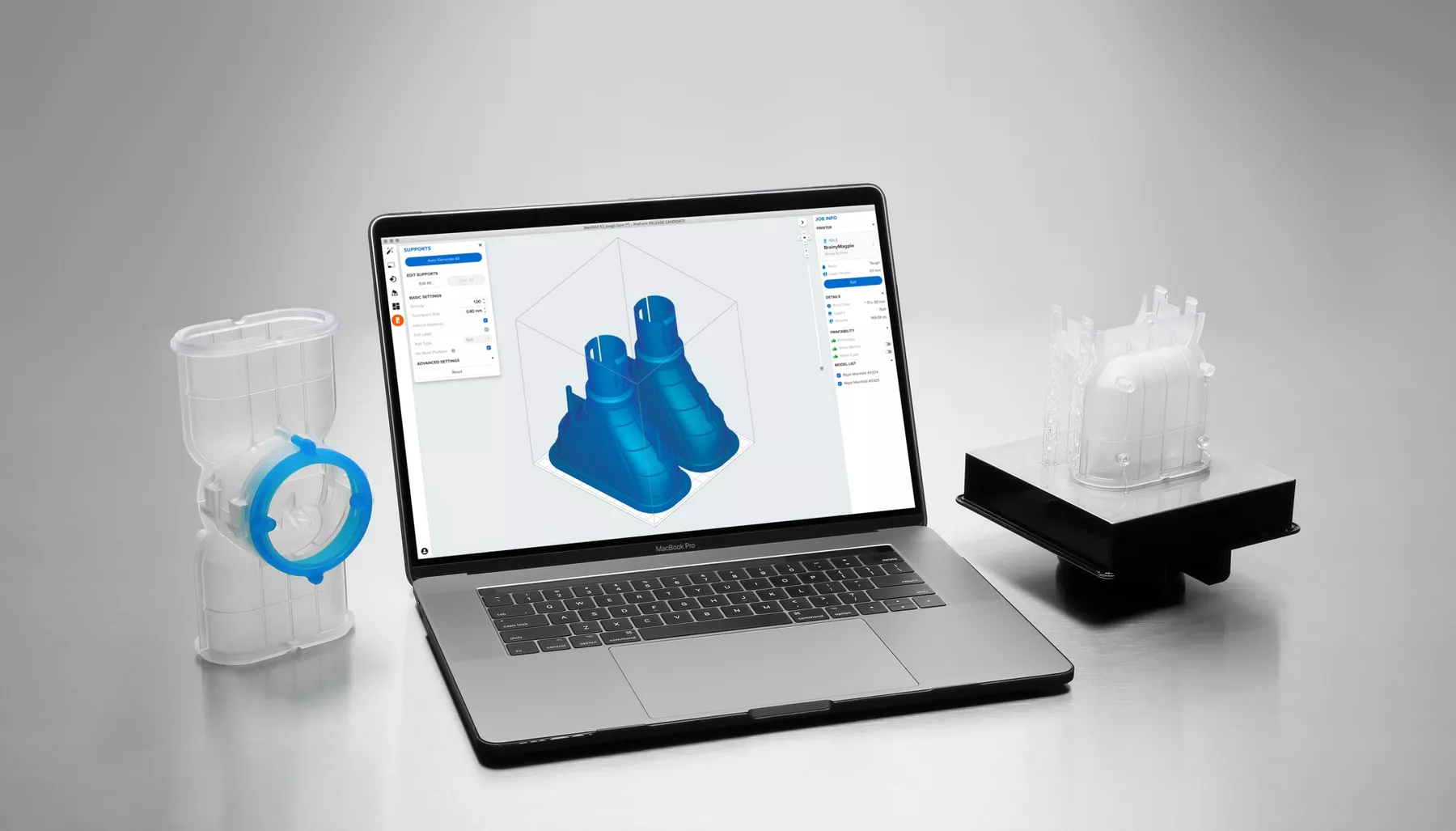
For SLA jobs, PreForm’s automated orientation and light-touch support generators ensure reliable results with minimal post-print cleanup.
Fleet Control & Centralized Supervision
When managing multiple 3D printers across campus makerspaces or departmental labs, PreForm Fleet Control and the web-based Formlabs Dashboard streamline administration:
- Centralized Job Queues: Students submit files to a single digital entry point rather than queuing for specific machines.
- Intelligent Routing: Fleet Control routes print jobs to available printers loaded with the matching resin or powder.
- Remote Lab Monitoring: Lab managers can track print progress, check material levels, and monitor system alerts from any web browser.
- Departmental Accounting: Track and export material usage metrics by student, course, or department for easy internal billing or grant reporting.
Lab Operation Best Practices
To keep your facility running smoothly during high-demand periods, pair your automated hardware with clear operational guidelines.

#1. Design-for-Additive Guidelines
Provide students with a straightforward design guide before they submit files:
- Minimum Wall Thickness: ≥ 1.0 mm for SLA; ≥ 1.22 mm for SLS.
- Drain Holes: Require internal voids in SLA models to include drain holes () to prevent trapped resin and print failures.
- File Preparation: Standardize on .3MF or .STL formats with units set explicitly to millimeters to prevent scaling mistakes.

#2. Predictable Production Schedules
Instead of running small, ad-hoc prints as files arrive, establish a clear routine:
- SLA Queues: Set up continuous production with Form Auto, scheduling dedicated runs for engineering-grade resins on fixed days.
- SLS Batching: Run full Fuse 1+ builds on set days (e.g., Tuesday and Thursday evenings). Auto-pack all validated student submissions into dense build cakes to optimize material use and laser uptime.

#3. Elevating the TA Role from Operator to Mentor
By automating manual routine tasks, TAs can pivot to pre-print file reviews and CAD guidance. Training TAs to inspect student files for printability before approving them into the queue reduces print failures, saves material, and teaches students real-world Design for Additive Manufacturing (DFAM) principles.
Get Your Lab ready for the Upcoming Semester
Whether you’re opening a new engineering makerspace or modernizing an existing facility, GoEngineer offers tailored hardware support, lab workflow consulting, and educational purchasing options. Looking to streamline your lab’s throughput this semester? Contact our educational additive manufacturing specialists today to schedule a consultation or request a customized Formlabs fleet quote.
Related Articles
Formlabs Fuse Sift: SLS Powder Dosing Made Easy
Guide to Using Formlabs PreForm Software for SLA 3D Printing
Building the Perfect EDU Lab: A Tiered Approach to Makerspace Excellence
Why Industrial Additive Certification is the Ultimate Student Placement Multiplier
About GoEngineer
GoEngineer delivers software, technology, and expertise that enable companies to unlock design innovation and deliver better products faster. With more than 40 years of experience and tens of thousands of customers in high tech, medical, machine design, energy and other industries, GoEngineer provides best-in-class design solutions from SOLIDWORKS CAD, Stratasys 3D printing, Creaform & Artec 3D scanning, CAMWorks, PLM, and more
Get our wide array of technical resources delivered right to your inbox. Unsubscribe at any time.