SWOOD Reactivation for Standalone Licenses

This guide covers the process for both a yearly SWOOD license reactivation and the reactivation after an upgrade to a newer version.
SWOOD Yearly Reactivation
SOLIDWORKS requires yearly reactivation. SWOOD requires a reactivation anytime there is a change to the license (i.e., a renewal or an upgrade). To do this, we must first transfer the license. Go to Tools > SWOOD Design > Help > Transfer License.

Follow the prompts, and once the transfer is complete, go to Tools > SWOOD Design > ? > Activate License. Follow the prompts, and the software will once again be activated. You may have to do this for multiple license types, depending on the changes made.
SWOOD Upgrade Reactivation
SWOOD is capable of being used up to 2 years behind SOLIDWORKS. Meaning, if you are running SWOOD 2025, you can use it in versions of SOLIDWORKS for 2023 (SP5) and 2024 (SP5) also.
Prior to upgrading the SWOOD software, you’ll want to transfer all the licenses. To do this, go to Tools > SWOOD Design > ? > Transfer License. Once the license is transferred, you’ll need to uninstall the current version of SWOOD. Once the old version is uninstalled, reinstall SWOOD.
Once reinstalled, we’ll need to get those licenses reactivated. After installing the software, launch SOLIDWORKS. The Activation Manager should automatically pop up on the screen. (If it doesn't, go to Tools > SWOOD Design (or CAM) > Help > Activate Licenses.)
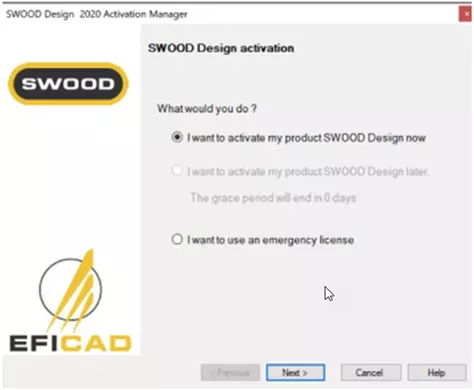
Select Next and enter your serial number and your email address in the Contact information box.
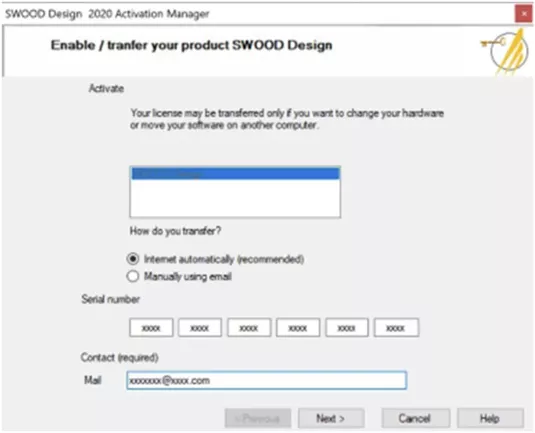
Select Next, and the window should now display that the license is enabled.
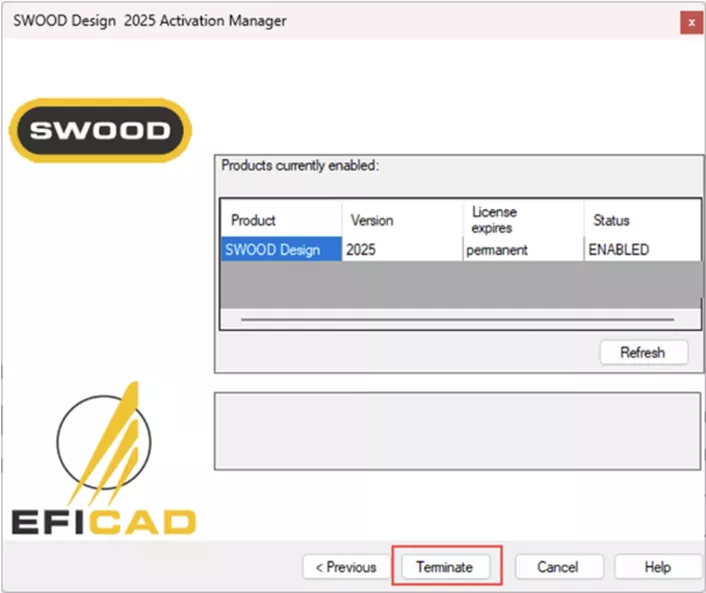
Select Terminate to close the window. If you have another license to activate, follow the same steps when the next activation window appears.
Questions?
I hope you found this SWOOD standalone license reactivation guide helpful. If you have questions or need additional help, please contact us.
Related Articles
SWOOD Standalone License Activation Guide
SWOOD Network License Activation Guide
KeyShot SOLIDWORKS Add-In Installation & Setup
McMaster-Carr SOLIDWORKS Add-In: Installation & Use

About Krystal Petersen
Krystal Petersen is a SOLIDWORKS Technical Support Engineer based out of Auburn Hills, Michigan. Krystal studied Product Engineering at Oakland Community College and has earned her CSWA and CSWP Certifications. She joined the VAR channel in 2015 with DASI (now GoEngineer). Krystal is a huge fan of Star Wars and likes to spend her off time fishing and camping.
Get our wide array of technical resources delivered right to your inbox.
Unsubscribe at any time.