Avoid Upgrade Surprises: SOLIDWORKS Electrical Connections with PDM

If you use the tools built into SOLIDWORKS Electrical to produce non-CAD documents and you use SOLIDWORKS PDM Professional, AND you are planning an upgrade soon, this article is for you.
While add-ins are (and have been) available to integrate SOLIDWORKS Electrical with PDM, this article refers specifically to the options that don't require those tools. These are found under SOLIDWORKS Electrical Tools > Link to PDM Configuration.
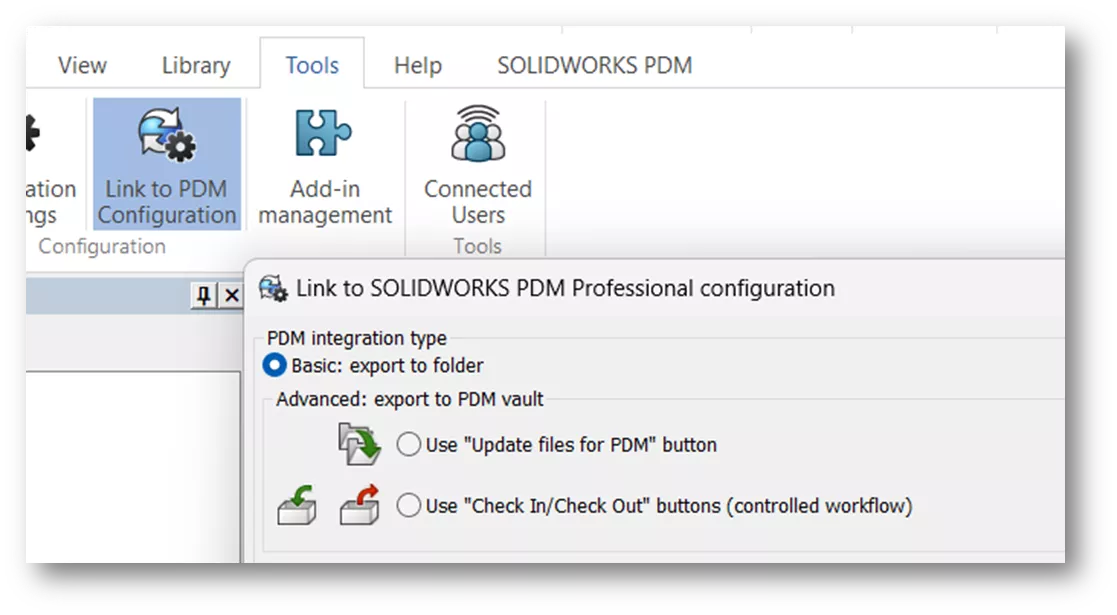
With this set of features, users can choose between Basic: export to folder or an Advanced export, which shows either of two button sets in the UI.
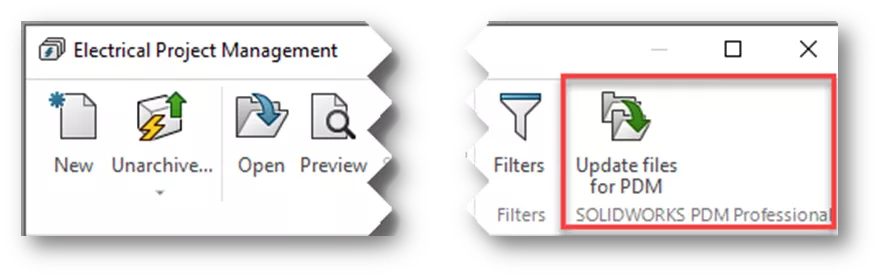
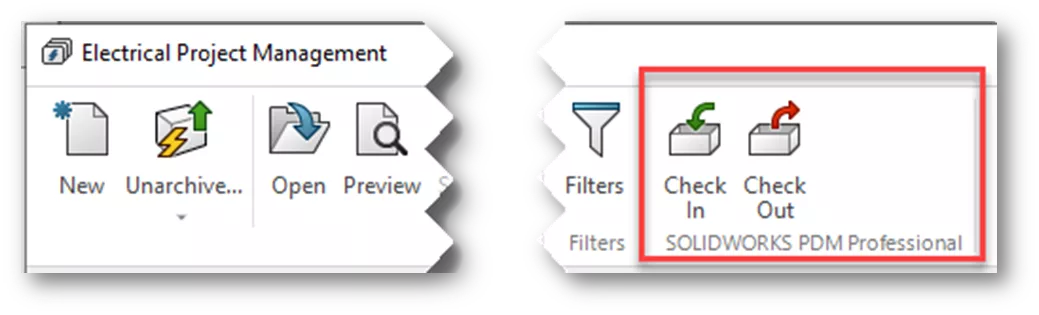
Why is this important? If your SOLIDWORKS Electrical users have a PDM Vault view, then they are connected to the PDM Server and may be affected by a new integration feature added in 2025. Prior to version 2025, changes to SOLIDWORKS Electrical user settings could be made directly on the client machine; with centralized management available only via an add-in. This add-in is now built into SOLIDWORKS PDM Professional 2025 and newer, and is installed automatically during the upgrade.
Afterward, users will find that local changes to their settings are NOT retained from one session to the next. This is due to these settings now being controlled by the PDM server Electrical integration feature - NOT the client machine.
What should we do? First and foremost, don't delay the upgrade due to this change. It's best to adopt the new integration between SOLIDWORKS PDM and SOLIDWORKS Electrical, and to properly configure the integration after the upgrade. You can refer to the Installation Guide for instructions on naming files and mapping variables. If you need assistance, contact your GoEngineer Account Manager.
If you’re looking for your Account Manager or your Customer Success Manager:
-
- Log in to the GoEngineer Customer Portal and locate your main dashboard.
- Your company’s Account Manager and Customer Success Manager (with their contact information) will be displayed front and center.
The other option is to work around the change. Electrical users can save their files (e.g., project archives, DWG/DXF drawings, PDF files, Excel exports) manually to their desktop. These files can then be added to the vault and then checked in.
As you prepare for your transition to SOLIDWORKS Electrical 2025 and its new PDM integration approach, taking time to understand these changes will save you from the unexpected headaches that can surface after an upgrade. Whether you choose to adopt the updated integration workflow or continue managing exports manually, establishing a clear plan ensures your team stays efficient and your data remains well-organized. By staying proactive and informed, you will keep your upgrade smooth, your processes consistent, and your users confident in the path forward. If assistance is ever needed, remember that expert resources are available to guide you through the best solution for your environment.
Related Articles
SOLIDWORKS Electrical 2026 - What's New
Search for Hidden Variables in SOLIDWORKS PDM
Removing or Deleting a Local Vault View in SOLIDWORKS PDM
Create Custom Wire Numbers in SOLIDWORKS Electrical 2D
SOLIDWORKS PDM – Create Local Host File Workaround as Temporary Solution

About Cheri Guntzviller
Cheri Guntzviller is a Senior Electrical Specialist with over 35 years’ experience. She earned her Bachelor of Science in Electrical Engineering degree from Lawrence Technological University and joined the VAR channel in 2013 with DASI (now GoEngineer). She is a problem solver and is passionate about teaching and helping others solve problems. Based out of Michigan Cheri enjoys gardening, fishing, construction, and spending time with her family and pets. Cheri is a SOLIDWORKS Certified Electrical Specialist, Trainer, and Professional Presenter.
Get our wide array of technical resources delivered right to your inbox.
Unsubscribe at any time.