SOLIDWORKS PDM – Create Local Host File Workaround as Temporary Solution

When troubleshooting connectivity issues in SOLIDWORKS PDM, creating or modifying a Windows local hosts file can be an effective way to bypass DNS problems and verify that a client workstation can communicate directly with the archive and database server. This is a plain text file that is used to map domain names to IP addresses manually and allows you to control how the machine resolves server names.
The purpose of this guide is to provide instructions for such a workaround until your network Domain Name Server (DNS) issues are resolved. Long-term use of Local Host Files to facilitate network connections is known to cause connection problems in PDM. This workaround is commonly used if the client machine is able to ping the IP address of the PDM server but not the server name itself.
Your DNS translates domain names to IP addresses (like goengineer.com) to 204.118.56.3. The same applies to servers with DNS that translate their name to the IP address. To override this function, you can edit a Local Hosts File to map specific domain/server names to the desired IP address. This can also be used to block these connections, so it’s important to pay close attention to detail. If it’s been determined that your DNS is having trouble translating host names and IP addresses, follow the instructions below.
Modifying the Local Host File
- Navigate to the Start Menu and type Notepad.
- Choose to run Notepad as Administrator.
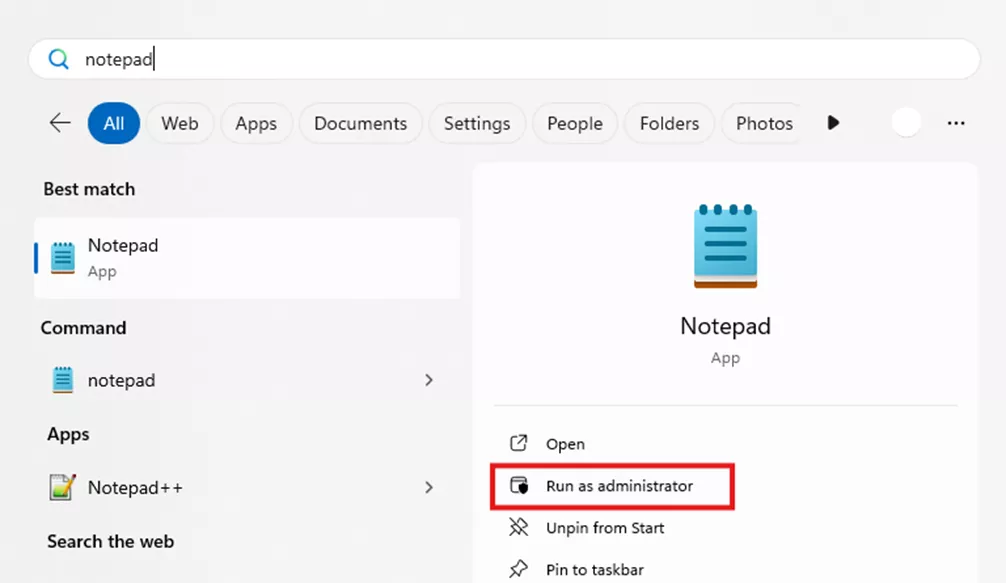
- Once in the Notepad window, click File > Open.
- Navigate to the path: C:\Windows\System32\drivers\etc\
- Note: Change the file type from Text Documents to All Files (shown below).
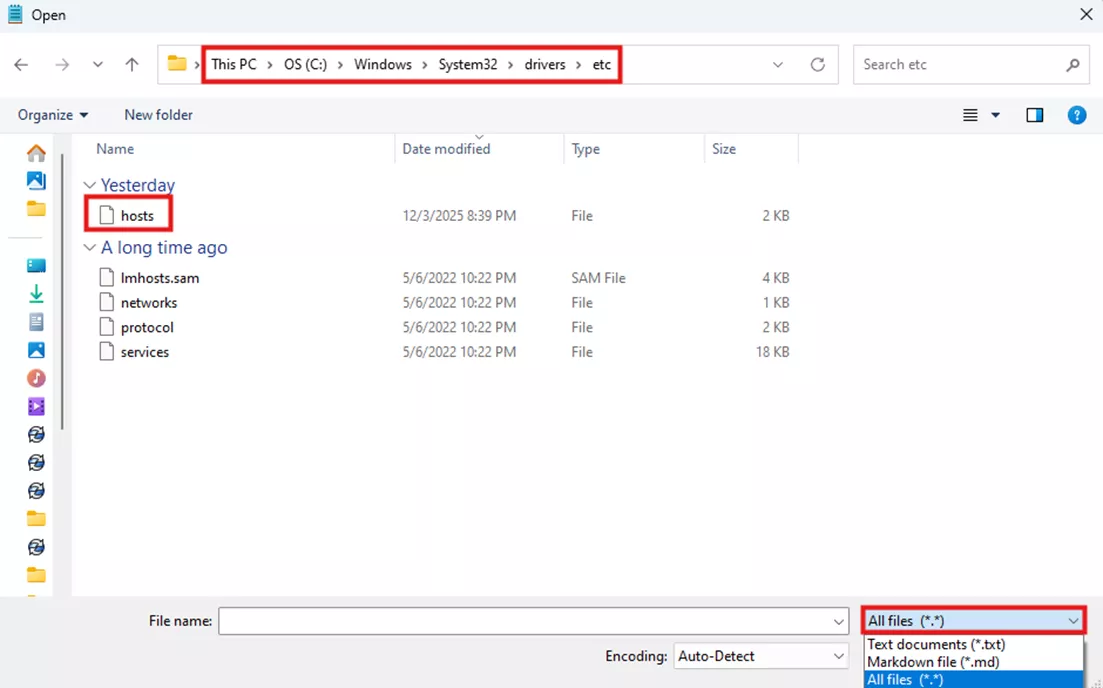
- Note: Change the file type from Text Documents to All Files (shown below).
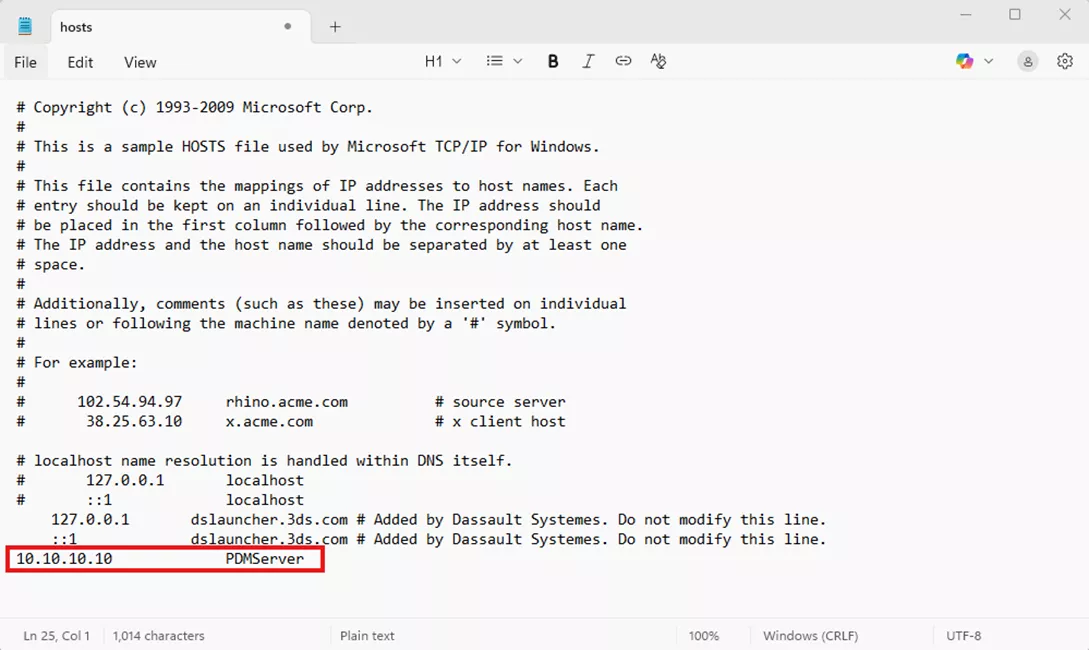
- Make necessary adjustments/entries in the hosts file to allow server IP addresses. On a new line, enter the IP address followed by the server name and then save the file.
Conclusion
Creating or modifying a local hosts file is a simple but effective step when diagnosing connection issues in SOLIDWORKS PDM. By temporarily overriding DNS and directing the client machine to the correct server IP, this can be used to quickly determine whether a name-resolution problem is at the core of a connectivity issue. As mentioned previously, this process is to be used as a short-term fix to work around DNS issues and is not recommended as a long-term solution. SOLIDWORKS PDM was designed to use server names to avoid using dynamic IP connections. Once your DNS issues have been resolved, you may delete the previous information in the hosts file.
If any assistance is needed during this process, consult with your IT department, or (if GoEngineer is your VAR) please reach out to our Technical Support team for additional help.
Editor's Note: This article was originally published in September 2017 and has been updated for accuracy and comprehensiveness.
24 Tips to Master SOLIDWORKS PDM
SHORTCUTS ⋅ SEARCHING ⋅ PDM ADD-IN
24 of our expert tips to help you master using SOLIDWORKS PDM. Improve performance, find files faster, and work like a pro.
Related Articles
Troubleshooting SOLIDWORKS PDM Notifications
Add the Released Version to the Face of the Drawing in SOLIDWORKS PDM
Fix SOLIDWORKS PDM Error Opening Archive
SOLIDWORKS PDM Attach Access: A Master Guide

About Alex Hoang
Alex Hoang is a Sr. Technical Support Engineer based in Seattle, Washington. He holds Administrative PDM and Certified SOLIDWORKS Professional (CSWP) certifications. Alex graduated with a Bachelor's degree in Mechanical Engineering from Washington State University and has a strong foundation in using SOLIDWORKS and data management software, allowing him to better understand customer needs. In his spare time, he enjoys playing tennis, training for marathons, and spending time outdoors.
Get our wide array of technical resources delivered right to your inbox.
Unsubscribe at any time.