What's New in SOLIDWORKS PDM 2027

SOLIDWORKS PDM 2027 introduces new capabilities that help administrators and users work more securely, efficiently, and confidently across desktop and web-based vault access.
From Single Sign-On and smarter task processing to more complete history tracking, better search, and a faster Web2 experience, this release brings new ways to manage engineering data and streamline everyday workflows. Here’s what’s new.
The updates at a glance
| Feature | Area | What it changes |
|---|---|---|
| Single Sign-On (SSO) | Security | Sign in to vault views and Web2 with corporate credentials and MFA |
| Task host load balancing | Administration | Queued tasks are distributed across available task hosts |
| Replicate by modification date | Administration | Scheduled replication can skip files older than a set date |
| Custom column sets in Web2 | Web2 | Switch between role-based column layouts in List View |
| Simplified multi-value search | Search | Paste a list of values and search them all at once |
| Days in State column | Workflow | See how long a file has sat in its current state |
| Refreshable file-in-use warnings | Workflow | Clear conflicts without restarting check-in or a transition |
| Expanded file history | History | Copy, move, and rename events are captured, searchable, and easier to filter |
Security and administration
Secure vault access with Single Sign-On
One of the most significant additions in SOLIDWORKS PDM 2027 is support for Single Sign-On (SSO) authentication for vault views.
Administrators can configure users to sign in with their organization’s credentials and supported multi-factor authentication methods instead of a PDM or Windows username and password. SOLIDWORKS PDM uses the OpenID Connect protocol and can integrate with identity providers such as Microsoft Entra ID, Google, Okta, Keycloak, and Auth0.

These SSO capabilities are also available in the PDM Web2 interface, so users can reach vault data in a browser with the same corporate sign-in experience.

Why it matters: Less password management, stronger authentication, and a more consistent sign-in experience across supported PDM access methods, for IT administrators and users alike.
Balance task host workloads
Organizations that rely heavily on automated PDM tasks can take advantage of new task host load balancing. Queued tasks are distributed across the available task hosts, making better use of your infrastructure and improving processing efficiency.
For environments that run large volumes of conversion, export, or other automated workflow tasks, spreading the workload helps reduce bottlenecks and improve overall throughput.

Replicate only the files you need
SOLIDWORKS PDM 2027 gives administrators more control over archive replication with the ability to replicate files by modification date. Scheduled replication can be limited to files modified after a specified date, so it focuses on the data you need instead of transferring the complete archive history.
For organizations managing large or geographically distributed vaults, this can reduce transfer time, bandwidth use, and storage requirements.
Note: Filtering by modification date applies to scheduled replication only. It does not apply to on-demand replication.

Web2 and search
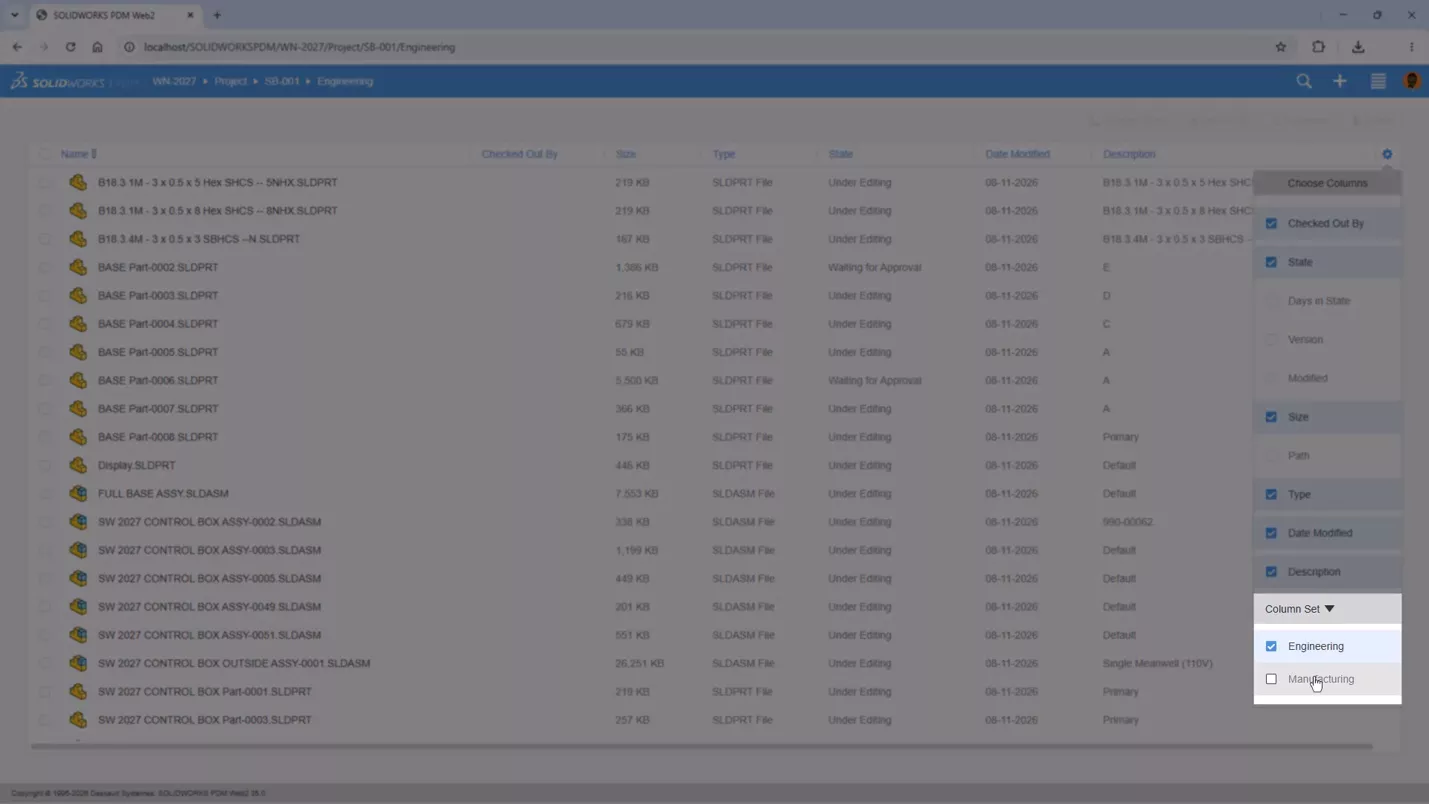
Personalize Web2 with custom column sets
Not every PDM user needs to see the same information. In the Web2 large-screen List View, users can switch among custom column sets configured by their vault administrator, so the information on screen matches the task at hand.
Design work
Emphasizes revision information, workflow states, and design metadata.
Production handoff
Shows the information downstream teams need when the focus shifts to production.
The result is less visual clutter and faster access to the data that matters to each role.
Find multiple files faster with simplified multi-value search
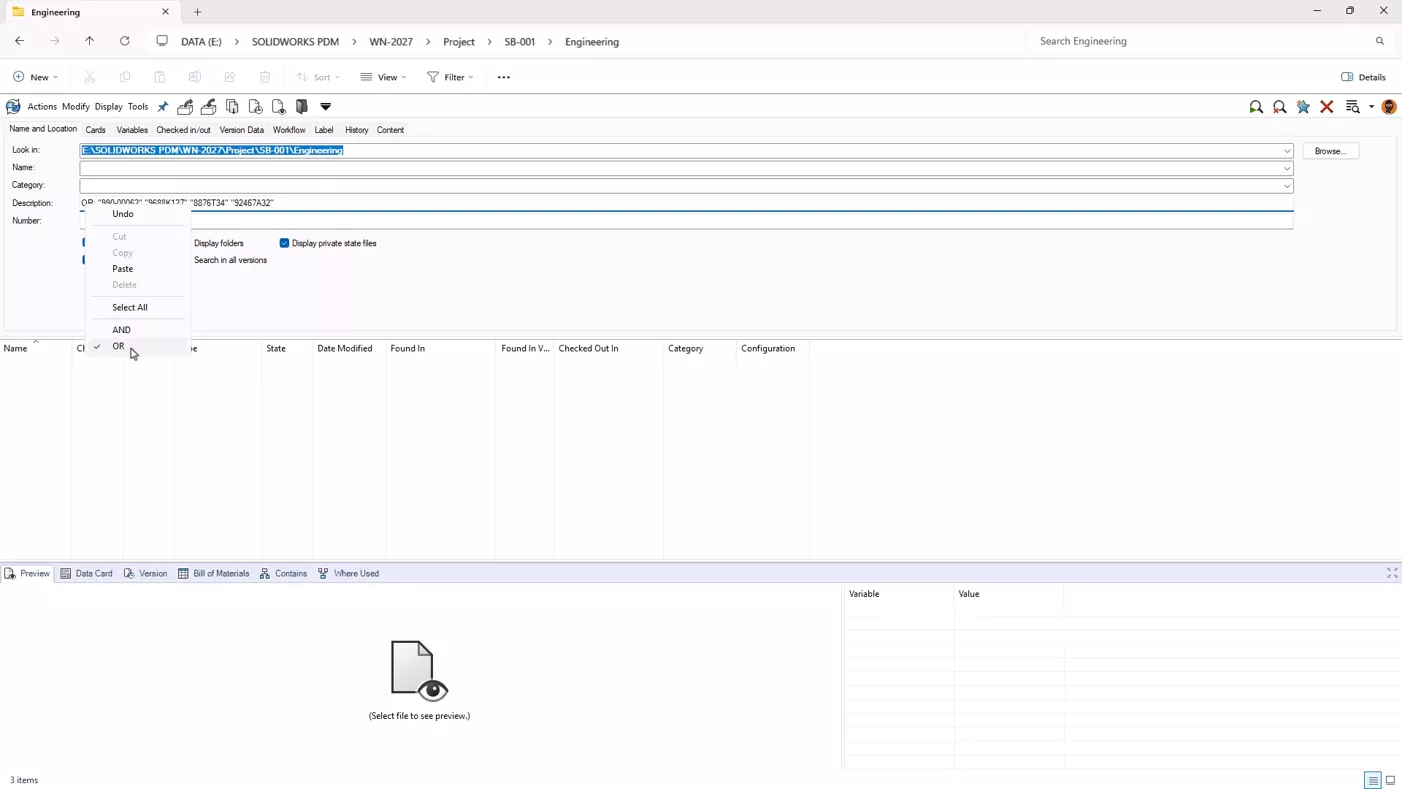
With Simplified Multi-Value Search, users can paste multiple values into a search field and search those entries using OR logic.
Instead of building complex search criteria, users can quickly locate groups of files by part number, document ID, or other metadata. It’s especially useful when someone receives a list of components or documents and needs to find the matching vault files.
Workflow visibility and conflicts
See how long files have been in a workflow state
The new Days in State column, available in the Contains and Where Used tabs, shows how long a file has remained in its current workflow state.
Teams can use it to spot files awaiting action, investigate bottlenecks, and monitor approval cycles.

Resolve file-in-use conflicts more efficiently
SOLIDWORKS PDM 2027 improves how users handle file conflicts during check-in and workflow transitions.
Close, fix, start over
- A file-in-use warning meant leaving the dialog.
- Users resolved the conflict elsewhere.
- The operation had to be restarted to see if the problem was cleared.
Refresh and continue
- Refresh file-in-use warnings right from the warning dialog.
- See which files are still in use and which are now available.
- Continue the operation once the conflict is resolved.
The improvement is most noticeable when many files are involved, since users no longer have to close and reopen dialogs repeatedly.

File history
More complete file history tracking
File history receives several substantial enhancements in 2027. PDM now captures copied, moved, and renamed file events directly in file history. These everyday actions provide important context when you’re investigating how a document changed over time.
The events are searchable, making it easier to investigate changes, answer user questions, troubleshoot unexpected behavior, and prepare for audits. Together, these improvements give a clearer picture of a file’s lifecycle and greater traceability throughout the vault.

Navigate file history more easily
SOLIDWORKS PDM 2027 doesn’t just capture more history; it makes that history easier to use:
- Filtering narrows the list to relevant events.
- A Details column shows additional information directly in the history list.
- Individual events can be expanded to reveal more context.
- Visible columns can be customized to show the information you need.
- History can be sorted by individual columns for faster analysis.
For files with long histories, these changes let users focus on the events that matter.

Search file history by event details
Enhanced History Search lets users search file history by event details, so specific actions, approvals, state changes, and other important events are easier to find.
Combined with the additional events now captured in history, it provides faster access to critical information and further improves traceability.
Additional Web2, administration, and compatibility enhancements
SOLIDWORKS PDM 2027 also includes several smaller enhancements that collectively improve administration and day-to-day use.
Faster Web2 browsing
Web API enhancements improve Web2 performance, with faster access to file lists and vault information.
Flexible date formats for Convert tasks
Convert tasks support customizable date formats, giving more flexibility when standardizing output naming conventions.
Toolbox version overwrite
Toolbox files can be updated without creating unnecessary file versions, keeping vault history cleaner.
Category changes in history
File category changes are recorded in history, adding useful information to the audit trail.
File version upgrade tracking
Version overwrite events generated during file upgrades are captured for greater visibility and traceability.
Fractional units in Web2 Measure
Web2 measurement tools support fractional units for users who work with fractional dimensions.
Customizable component display
Assembly views in Web2 can show descriptions, configurations, and component references, making components easier to identify.
Expanded eDrawings file support
eDrawings can preview newer versions of leading CAD formats, reducing the need to convert files before viewing them.
Support for newer SOLIDWORKS releases
Organizations can now run a previous version of SOLIDWORKS PDM while supporting one newer release of SOLIDWORKS Design and eDrawings, giving more flexibility for upgrade planning and deployment.
| PDM release | SW 2030 | SW 2029 | SW 2028 | SW 2027 | SW 2026 | SW 2025 | SW 2024 |
|---|---|---|---|---|---|---|---|
| PDM 2029 SP03 | ✓ | ✓ | ✓ | ✓ | ✕ | ✕ | ✕ |
| PDM 2028 SP03 | ✕ | ✓ | ✓ | ✓ | ✓ | ✕ | ✕ |
| PDM 2027 SP03 | ✕ | ✕ | ✓ | ✓ | ✓ | ✓ | ✕ |
| PDM 2026 SP03 | ✕ | ✕ | ✕ | ✓ | ✓ | ✓ | ✓ |
A more secure, traceable, and efficient PDM experience
SOLIDWORKS PDM 2027 combines major capabilities with a long list of usability improvements:
Security
Single Sign-On modernizes authentication across vault views and Web2.
Infrastructure
Balanced task processing and date-based replication make PDM infrastructure more efficient to run.
Visibility
Days in State, expanded history, and Enhanced History Search show what’s happening to files and workflows.
Meanwhile, improvements throughout Web2 make browser-based access faster and more flexible. Taken together, these enhancements give administrators and end users a stronger, more efficient foundation for managing engineering data in SOLIDWORKS PDM.
See every SOLIDWORKS 2027 update in action
This post covers SOLIDWORKS PDM. The full launch event goes further, with GoEngineer experts walking through the release’s standout features, performance gains, and AI capabilities.
Related articles
New SOLIDWORKS PDM 2026 Vault View Sync & Ownership Transfer
Configure a Computer to Be a Task Host: SOLIDWORKS PDM
SOLIDWORKS PDM File History View Errors
SOLIDWORKS PDM Revisions: Database Revision vs. Revision Variable
About Michael Souders
Michael Souders is a Data Management Specialist at GoEngineer.
Get our wide array of technical resources delivered right to your inbox.
Unsubscribe at any time.