SOLIDWORKS Is Discontinuing Adaptive Meshing - What Does This Mean?

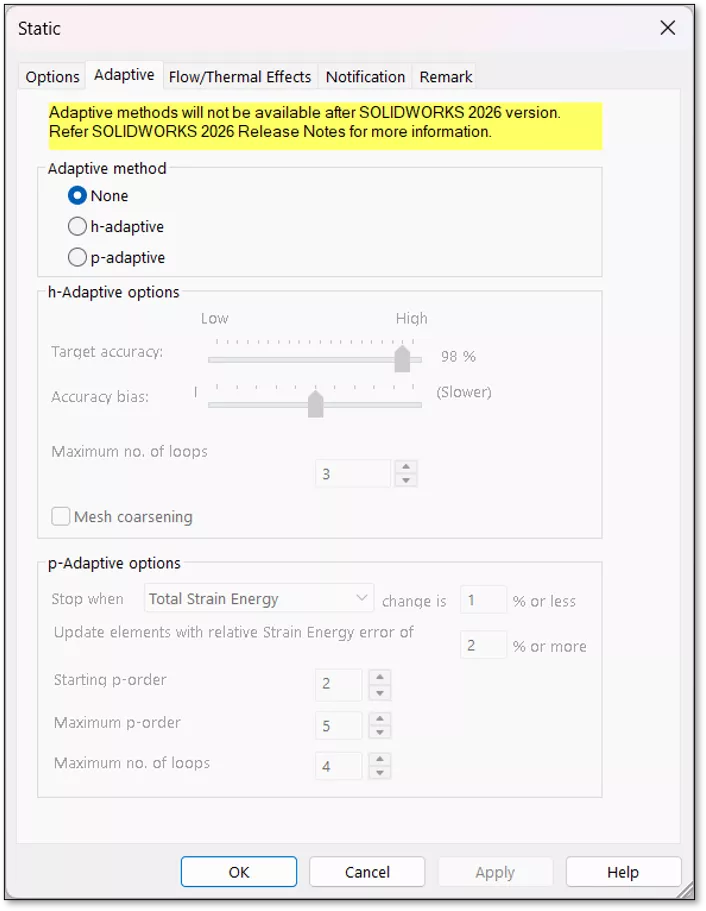
Adaptive meshing is a tool in SOLIDWORKS Simulation used to automate the mesh refinement process, generating a mesh that is tight enough for reliable results without unnecessary over-refinement. There are two kinds of adaptive meshing:
- The h-adaptive method runs multiple iterations of a study using meshes with varying element sizes to find the point at which the study’s results converge. This means further refinement would only slow down the calculation without improving accuracy.
- On the other hand, the p-adaptive method does not change the size of the mesh’s elements but instead refines each element’s resolution (A.K.A. an element’s “order”), adding more nodes per element. This method has the same goal – finding the point at which results converge – but accomplishes it differently.
However, it is time we bid farewell to both adaptive meshing methods. SOLIDWORKS 2026 will be the last version to include them.
What Does This Mean? Life Without Adaptive Meshing
While these tools can be quite useful, they're not perfect. Relying exclusively on automatic adaptive meshing can give you a mesh that is overly refined in certain regions of the model that might not be of primary concern, leading to an unnecessarily long solve time. SOLIDWORKS is not an engineer – it does not know where to focus its efforts the way a human would.
Without adaptive meshing, the best practice is to use mesh controls and to experiment with the three available meshers (Standard, Curvature-Based, and Blended Curvature-Based) to manually refine a mesh. While this requires a bit more user input, it also allows for a more customized, precisely refined mesh – you can specify exactly how fine your mesh is in specific regions of your model.
Most users refine meshes manually, but for those who do use adaptive meshing, we can expect more information around October 2026, when new functionality for SOLIDWORKS Simulation 2027 will be introduced. If we get to that point and you still wish adaptive meshing were available, reach out to GoEngineer's team – we can help develop a workaround or provide training for a better process.
More SOLIDWORKS Simulation Tips
Using Symmetry in SOLIDWORKS Simulation Studies
Color Accuracy in SOLIDWORKS Simulation Result Plots
SOLIDWORKS Impact from Beginning to End
SOLIDWORKS Thermal Stress From Beginning to End

About Connor Bucka
Connor Bucka is an Application Engineer and Certified SOLIDWORKS Expert (CSWE) specializing in simulation at GoEngineer. He obtained his degree in Mechanical Engineering from San Diego State University and has been with GoEngineer since 2020.
Get our wide array of technical resources delivered right to your inbox.
Unsubscribe at any time.